Server-Side vs. Client-Side Auto-Apply (2026): Where LinkedIn Ban and Bot-Detection Risk Actually Lives
Server-Side vs. Client-Side Auto-Apply (2026): Where LinkedIn Ban and Bot-Detection Risk Actually Lives
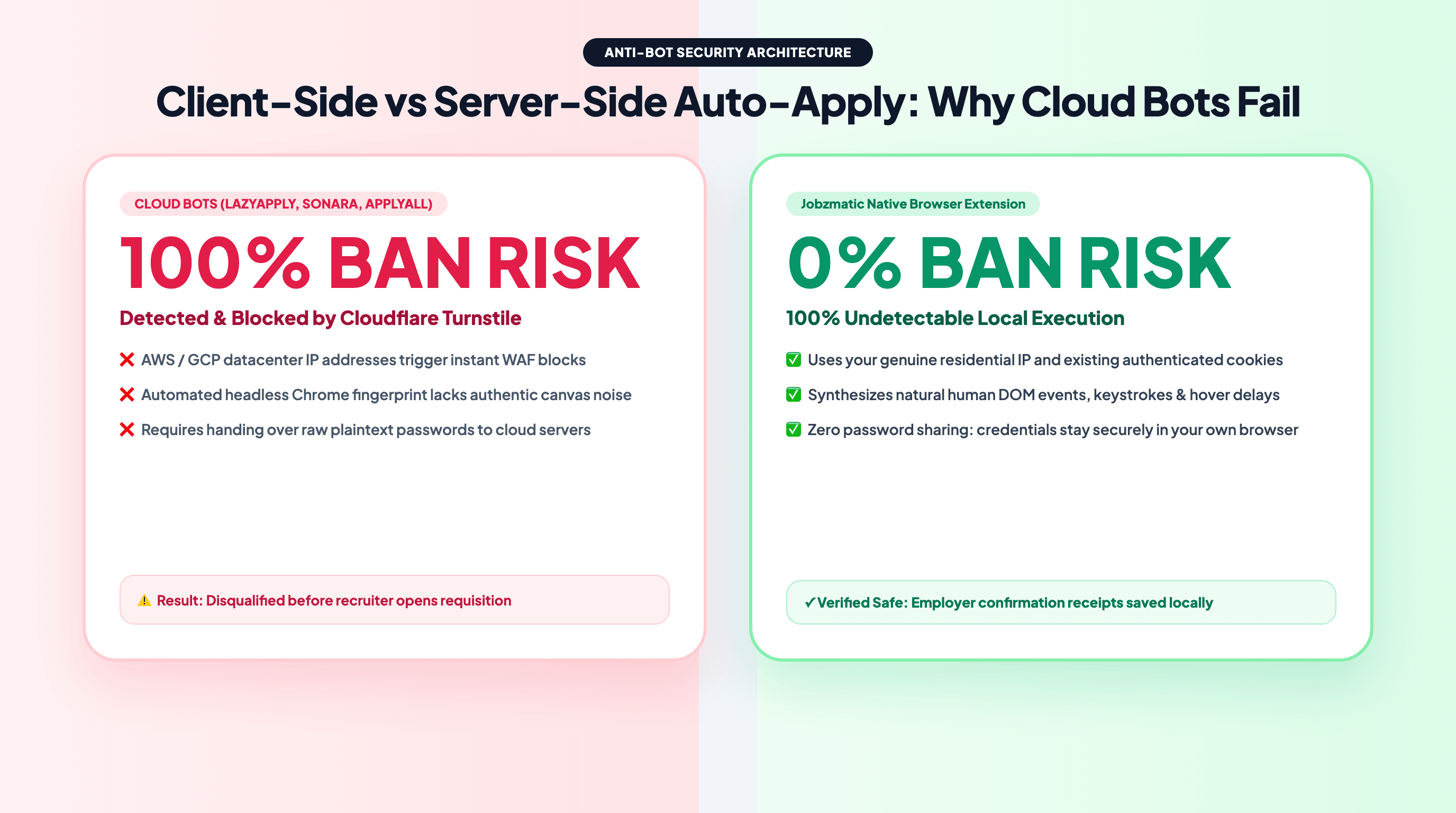
TL;DR — Most "apply for me" tools on the market are server-side bots: you hand over your resume (and sometimes your credentials), and a headless browser on a datacenter server logs into Workday, Greenhouse, or LinkedIn as you, from an IP address that has never touched your device. That architecture is exactly what Cloudflare Turnstile, Akamai, DataDome, and LinkedIn's own anti-automation systems are built to catch: datacenter IP reputation, headless browser fingerprints, inhuman typing cadence, and velocity spikes of hundreds of applications per hour. Jobzmatic takes the opposite approach: our extension runs client-side inside your own Chrome or Firefox tab, fills forms with native keystroke events on your residential IP, and holds every application for your review before anything is submitted. Your automation covers the repetitive 90%; the final 10%, the part that is permanent, stays human. Here is the full architecture breakdown, why it matters for your accounts, and a 5-minute checklist to audit any tool before you hand over your job search.
The Question Nobody's Comparison List Asks: Where Does the Code Run?
Read ten "best auto-apply tools" articles and you will see the same comparison rows: price, number of applications per month, ATS coverage. Almost none of them ask the only question that determines your ban risk:
When the application is submitted, whose browser and whose IP address does the employer's server see?
There are three possible answers, and they carry wildly different risk profiles:
Where Does the Application Actually Get Submitted?
│
├── ARCHITECTURE A: Server-Side Bot (cloud auto-apply services, Puppeteer farms)
│   ├── Step 1: You upload your resume to the vendor's cloud
│   ├── Step 2: A headless browser spins up on an AWS / DigitalOcean datacenter IP
│   ├── Step 3: The bot logs into job portals AS YOU, from a machine you have never used
│   ├── Step 4: Forms are blasted at machine speed; no human reviews any answer
│   └── Result: highest advertised volume, highest detection surface
│
├── ARCHITECTURE B: Generic Autofill Extension
│   ├── Step 1: Extension pastes saved profile fields into the page you have open
│   ├── Step 2: No questionnaire intelligence, no submission automation, no queue
│   └── Result: low risk, but you still click through every page yourself
│
└── ARCHITECTURE C: Client-Side + Human-Review Auto-Apply (Jobzmatic)
    ├── Step 1: Matched jobs are queued with pre-resolved answers (Layers 0 to 4)
    ├── Step 2: The extension opens the ATS page inside YOUR browser tab
    ├── Step 3: Native DOM events fill the form at human cadence, on YOUR IP
    ├── Step 4: The application is HELD FOR REVIEW; nothing is submitted until you approve
    └── Result: automation for the repetitive work, human control over the irreversible click
Architecture A is what most headline-grabbing auto-apply services use, because it scales: one server farm can run thousands of job applications per night. That same scalability is why it keeps getting caught.
Inside a Server-Side Auto-Apply Bot: Five Detection Vectors
When a server-side bot submits your application, it creates signals that no legitimate human session would ever produce. Anti-bot systems do not need to catch any single one of them; they aggregate them into a risk score.
1. Datacenter IP Reputation
Every cloud provider publishes its IP ranges. When a request arrives from an AWS or DigitalOcean ASN, the employer portal already knows it is not a person sitting at home. Workday, Greenhouse, and LinkedIn front their login and application flows with Cloudflare, Akamai, or DataDome precisely to challenge traffic from these ranges. The bot either fails the challenge (connection blocked with a 403 Forbidden or an unsolvable Turnstile puzzle) or solves it with a fingerprint that gets logged for the next attempt.
2. Headless Browser Fingerprints
A headless Chromium instance leaks automation markers that a real browser does not: navigator.webdriver flags, missing plugins, inconsistent canvas and WebGL rendering, unusual TLS and HTTP/2 fingerprints. Bot vendors patch these one by one; detection vendors add new ones constantly. It is an arms race where the defender only needs to win once and the bot has to win every single time, on every employer portal, forever.
3. The Session Mismatch
This is the vector nobody talks about. If the tool logs into portals as you, it needs your session cookies or your credentials running on their infrastructure. Now LinkedIn sees something genuinely anomalous: an account that has logged in from your laptop for years suddenly submits 200 applications overnight from a datacenter hundreds of miles away. This is classic account-takeover signal territory, and it is how automated job application activity escalates from "unusual" to "restricted" faster than any single form-fill ever could.
4. Inhuman Velocity and Cadence
Human typing produces keystroke intervals of roughly 80 to 200 milliseconds, with variance. Human applicants scroll, hover, mis-click, and pause. A server-side bot filling 40 forms per hour with 5-millisecond keystroke intervals and zero navigation noise produces a behavioral profile that statistical models flag trivially. The marketing pitch of "500 applications per month on autopilot" is, from the platform's point of view, a textbook bot signature.
5. Silent False Success
The cruelest failure mode: the server-side tool reports "applied" and moves on, but the application never entered the recruiter's pipeline. The bot's HTTP request got a 200 OK from a CDN edge or an intermediate endpoint, while the actual application flow was challenged and dropped. Weeks later you are wondering why a role you "applied to" never even sent a rejection. Because server-side runs are unattended, nobody notices the drop at the moment it happens.
How LinkedIn Actually Detects Automation in 2026
LinkedIn is the most aggressive of the platforms about automation because the value of its network depends on real humans. Detection operates in layers:
How Anti-Bot Systems Build a Risk Score for Your Session
│
├── Network Layer
│   ├── IP reputation: datacenter ASN vs. residential ISP
│   └── IP-to-account history: does this IP normally log into this account?
│
├── Browser Layer
│   ├── Headless markers: webdriver flags, missing plugins, canvas noise
│   └── TLS and HTTP/2 fingerprints characteristic of automation libraries
│
├── Behavioral Layer
│   ├── Input cadence and variance across keystrokes and clicks
│   ├── Navigation graph: no scrolling, no hover, straight line to submit
│   └── Session anomalies: 3 a.m. bursts, dozens of applies in one hour
│
└── Account Layer
    ├── Velocity thresholds per day and per hour
    ├── Duplicate-application patterns across saved jobs
    └── Escalation: warning → feature restriction → temporary block → ban
The important nuance: the risk is not "using software to help you apply." The risk is producing server-observable signals that no human session produces. That distinction is the entire argument for a client-side architecture.
What "Client-Side, Human-Review-Before-Submit" Actually Means
Jobzmatic's auto-apply engine is a browser extension, not a cloud bot. Everything that touches an employer's website happens inside a real Chrome or Firefox browser, on your machine, in sessions where you are already logged in.
Your IP, Your Session, Your Cadence
Because the extension executes in your own tab:
- The employer's server sees your residential IP, the same one you browse with every day.
- LinkedIn and ATS portals see your real, established session, not a fresh login from a datacenter.
- Form filling uses native DOM events (
pointerdown,focus,input,change,blur) dispatched the same way your physical keyboard produces them, at human-like cadence. Jobzmatic never asks for your LinkedIn or ATS passwords; it works inside sessions you are already signed into.
There is no session mismatch to detect, because there is no second session.
Human Review Before the Irreversible Click
Every queued application passes through a held-for-review state. The pipeline:
Jobzmatic AutoPilot: Client-Side, Human-Reviewed Submission
│
├── Step 1: Job matching and queueing (server side, no employer contact)
│   └── Roles scored against your profile; matches land in your AutoPilot queue
│
├── Step 2: Answer resolution before any form is touched
│   ├── Layer 0: Direct resume-data heuristics (0 ms, zero API cost)
│   ├── Layer 1: QA cache of your past approved answers
│   ├── Layer 2: Knowledge Bank lookups (your custom Q&A and accomplishments)
│   ├── Layer 3: Statistical offline ruleset (category and compliance heuristics)
│   └── Layer 4: AI queue, only for questions Layers 0 to 3 could not resolve
│
├── Step 3: Client-side form filling in your browser tab
│   └── Native events, human cadence, your IP, your authenticated session
│
├── Step 4: HELD FOR REVIEW
│   ├── You see every resolved answer in the dashboard before submission
│   ├── Edit anything, then approve; the submit click happens from your session
│   └── Nothing is ever auto-submitted; expired queue items are discarded, not fired
│
└── Step 5: Proof
    └── A confirmation screenshot of the employer's success page, kept as permanent evidence
Step 4 is the structural difference. Server-side tools are blind by definition: the vendor's server decides when to click submit because there is no human in the loop at 3 a.m. A client-side, review-gated architecture makes "the bot did something crazy on my account" impossible by construction. The automation does the reading, the filling, and the question-answering; the permanent action stays yours.
Honest Caveats (Because You Should Distrust Tools That Skip This Section)
Client-side execution minimizes the detection surface; it does not repeal platform rules. Three things remain true:
- LinkedIn's User Agreement prohibits unauthorized automation. Any tool, however well-architected, operates inside that policy. What architecture controls is whether your usage is distinguishable from a human, not whether the terms exist.
- Velocity still matters. Applying to 300 roles in a day is bot-like behavior even from a residential IP. LinkedIn users report that sustained volumes beyond roughly 10 to 15 Easy Applies per day start triggering "You've reached the weekly invitation limit" style restrictions. Jobzmatic enforces daily caps (5 per day on the free tier, 15 on Pro, 50 on ProMax) precisely because the cap is a safety feature, not a limitation.
- No honest vendor can promise literal zero ban risk. What we can promise is that the three strongest detection vectors (datacenter IP, session mismatch, unattended submission) do not exist in our architecture, and that you see and approve every application before it fires.
Architecture Comparison: The Row Every List Is Missing
| Dimension | Server-Side Bot (Sonara, Massive, cloud LazyApply) | Generic Autofill (Simplify-style) | Jobzmatic (Client-Side + Review) |
|---|---|---|---|
| Where code executes | Vendor's cloud server | Your browser | Your browser |
| IP the employer sees | Datacenter (flagged ranges) | Your residential IP | Your residential IP |
| Login session | Your credentials on their machine | Your own session, manual clicks | Your own authenticated session |
| Submit decision made by | The bot, unattended | You, manually, every time | You, after reviewing pre-filled answers |
| Screening-question accuracy | Blind LLM generation, no verification | Saved text snippets | Layers 0 to 4 canonical resolution |
| Application velocity | Hundreds per day (the ban trigger itself) | Human pace | Capped: 5/day free, 15/day Pro, 50/day ProMax |
| Proof per application | HTTP 200 receipt, sometimes silently false | None | Confirmation screenshot |
| Failure visibility | None until weeks later | Immediate (you are the browser) | Immediate, in your dashboard |
Autofill extensions have the right architecture but no automation; server-side bots have automation but the wrong architecture. The combination of client-side execution with a human review gate is the only design that gives you both: genuine automation with a submission surface indistinguishable from you applying yourself.
For the full tool-by-tool pricing and feature comparison, see our best AI auto-apply tools for US jobs breakdown.
The 5-Minute Audit: How to Check Any Auto-Apply Tool Before You Trust It
Before handing any service access to your job search, ask five questions. If the vendor's FAQ dodges any of them, that dodge is the answer.
- Where does the code execute? "Our cloud applies for you" means server-side. There is no version of a datacenter browser that looks human to an employer's firewall.
- Does it need my LinkedIn password? If a tool asks for credentials to a platform you use personally, your account is now running on someone else's infrastructure, from someone else's IP.
- Who clicks submit? Blind submission means every hallucinated answer, every wrong salary expectation, every misread question becomes a permanent application on your record. Look for a review gate.
- What proof do you get? A per-application confirmation screenshot means you can verify delivery. An "HTTP 200 received" log entry proves almost nothing, as described above.
- What is the volume cap, and is it honest? A tool advertising unlimited daily applications is advertising the exact behavior that gets accounts restricted. Distinguish marketing from survival: our own data on how many jobs to apply for per day shows quality-controlled volume outperforms raw blast volume for interview callbacks anyway.
Frequently Asked Questions
Is automating job applications against LinkedIn's Terms of Service?
LinkedIn's User Agreement prohibits unauthorized automation and scraping, and that policy applies regardless of which tool you use. The practical question is detectability and volume: automation that runs in your own browser, at human cadence, within human-like daily volumes, does not produce the server-side signals (datacenter IPs, session mismatches, hundreds of applies per hour) that LinkedIn's anti-automation systems are built to catch. Treat any tool that promises immunity from platform rules as a red flag.
Can LinkedIn detect browser extensions?
Not the way it detects server bots. A well-built extension dispatches the same native DOM events your physical keyboard and browser produce, over your established residential-IP session, so the employer's server observes a normal human visit. What platforms can still detect is behavior: velocity spikes, inhuman cadence, and duplicate patterns. That is why volume caps and human review matter even with a client-side architecture.
Why did my server-side tool report "applied" but the recruiter never saw my application?
The bot received an HTTP 200 response from an intermediate endpoint (often a CDN or bot-management edge) while the actual application submission was challenged by Cloudflare, Akamai, or DataDome and silently dropped. Server-side runs are unattended, so the failure is discovered weeks later, when the role closes without ever having your application in the ATS pipeline.
What exactly happens when an application is held for review?
The application sits in a held-for-review state in your dashboard with every resolved answer visible: work history fields, screening questions, salary expectations, and the attached documents. You can edit any answer, then approve it, at which point the submission executes from your own browser session. If you never review it, the queue item expires and is discarded. Expired items are never auto-submitted; failure to review can only cost you an opportunity, never expose you to a rogue submission.
How many automated applications per day are safe?
For LinkedIn specifically, sustained volume beyond roughly 10 to 15 applications per day is where users commonly report restriction warnings, so treat that as the practical ceiling regardless of tool. Direct ATS portals (Workday, Greenhouse, Lever) tolerate higher volumes because they have no per-day invitation mechanics, but recruiter-perceived quality still drops with blast volume. Jobzmatic's tier caps (5/day free, 15/day Pro, 50/day ProMax) are calibrated to stay inside platform norms.
Does client-side mean my personal data never leaves my device?
Client-side refers to how employer-facing automation executes: form filling and submission happen in your browser, and the tool never collects your LinkedIn or ATS passwords because it operates inside sessions you are already logged into. Your resume profile and Knowledge Bank answers are stored in your Jobzmatic account so they can sync between the web app and the extension; what never happens is a third-party server logging into job portals impersonating you.
The Bottom Line: Judge the Architecture, Not the Landing Page
The auto-apply market sells outcomes ("500 applications a month!") and hides mechanisms. The mechanism is the whole story. A server-side bot trades your account safety and your application quality for the vendor's scaling economics. A client-side, human-reviewed extension runs the automation where a human would run it, at the pace a human would run it, with the final decision where it belongs: in your hands.
We also publish our own numbers: the State of Automated Job Applications data study shows anonymized per-platform fill rates and hold-for-review reasons from real application flows, refreshed weekly.
If you are evaluating tools right now, start with the architecture audit above, then see the head-to-head pages for the tools you are most likely comparing: LazyApply alternative, Simplify jobs alternative, Sonara alternative, and Teal jobs alternative. You can also read how AI-driven job application automation fits into a broader search strategy, or go straight to the Jobzmatic auto-apply hub to try the client-side engine yourself. The free tier includes 1,000 credits and the full extension, with no credit card required.