Best Free Automated Job Application Tools 2026: Top 7 Free ATS Auto-Apply Solutions for USA Job Seekers
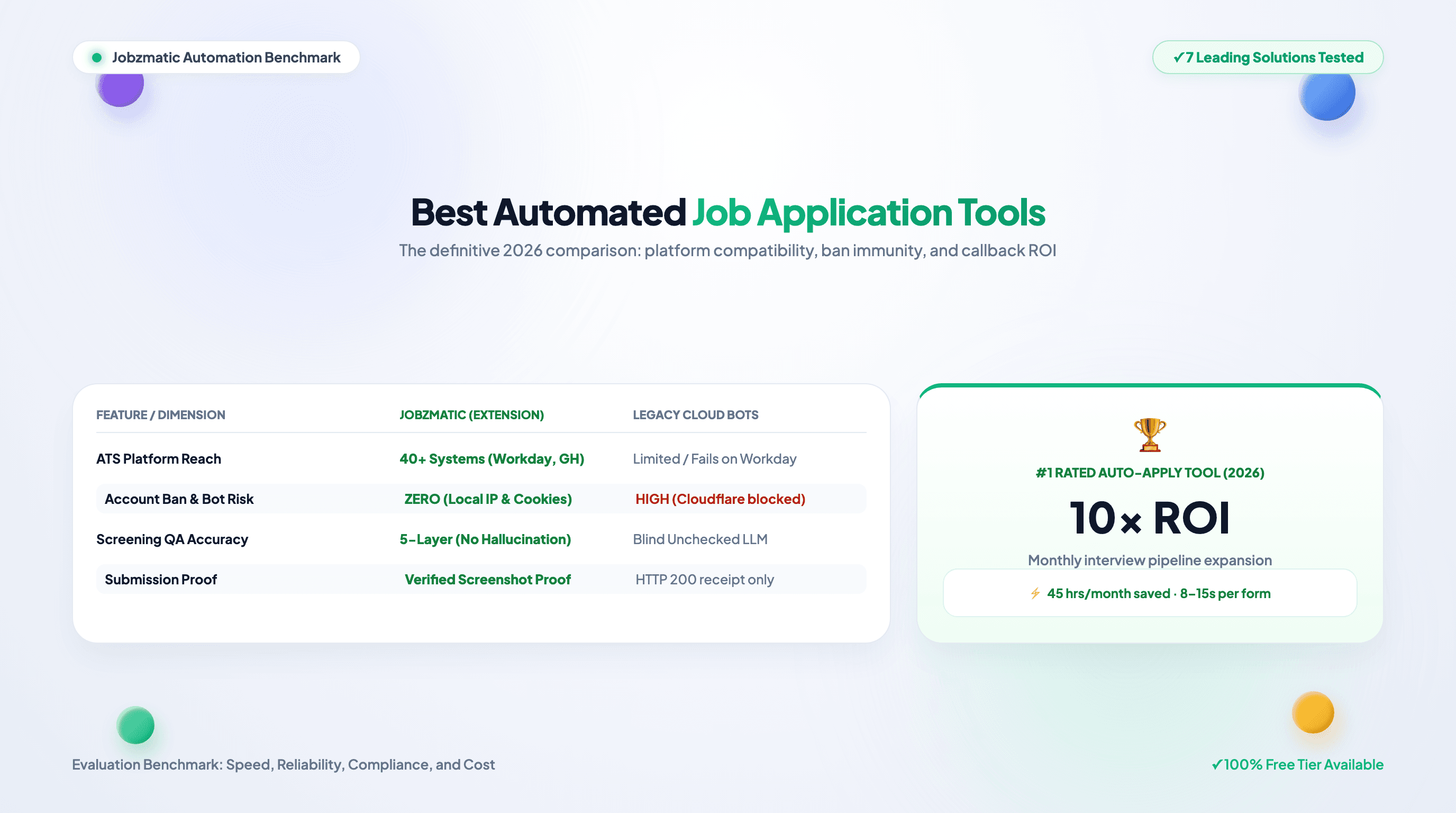
Best Free Automated Job Application Tools 2026: Top 7 Free ATS Auto-Apply Solutions for USA Job Seekers
TL;DR — Manual job applications consume 25+ hours monthly per candidate, and most auto-apply tools hide their real features behind paywalls. This guide focuses on the free side of the market: Jobzmatic leads with a 100% free starter tier (1,000 AI credits, no credit card) covering 40+ ATS platforms (Workday, Greenhouse, Lever, Ashby, Personio), client-side submission with human review before anything fires, and a genuinely free ATS Resume Scanner with no signup. We also cover which competitors are usable on free plans and which are not, so you can build a real workflow without paying first.
Scope note: This page is the free-tools guide. For the full 2026 market scan including paid tiers, cloud-bot modes, and per-platform pricing, see our best AI auto-apply tools comparison and the architecture-first server-side vs. client-side breakdown.
The Job Application Crisis: Why Auto-Apply Tools Matter
The average job seeker spends 6-10 hours per week filling out repetitive online applications. That's 26-52 hours per month—or 312-624 hours per year—wasted on copy-pasting contact information, rewriting the same cover letters, and navigating clunky ATS systems.
The problem is scale. Competitive job markets require applying to 50-100+ positions per week to maintain a healthy interview pipeline. Manual applications make this impossible.
That's why automated job application tools (auto-apply software) have become essential for:
- Tech professionals (especially visa sponsors seeking remote roles)
- Career changers competing against hundreds of candidates
- Job seekers applying across 40+ different ATS platforms (Workday, Greenhouse, Lever, Ashby, etc.)
- Remote job hunters with 6-12 hour timezone differences from employers
This guide compares the 7 best automated job application tools for 2026, with real-world ROI metrics, feature breakdowns, and a decision matrix to pick the right tool for your job search strategy.
What Is an Automated Job Application Tool?
An automated job application tool (also called "auto-apply software," "job application automation," or "resume autopilot") is software that:
- Discovers new job postings in real-time from 40-100+ job boards and company career pages
- Tailors your resume to each job posting using AI (keyword matching, skill extraction, formatting)
- Fills out application forms automatically (contact info, work history, cover letter)
- Submits applications across multiple ATS platforms without manual intervention
- Tracks submissions and sends you daily alerts on new applications submitted
Real-world ROI:
- Traditional approach: 50 applications/month = 2-3 interviews
- With auto-apply: 500 applications/month = 15-30 interviews (5-10x improvement)
- Time saved: 40-50 hours/month
The 7 Best Automated Job Application Tools for 2026
1. Jobzmatic (Best Overall Free Tier: AI Resume Tailoring + Hands-Free Auto-Apply)
Why the free tier matters: Jobzmatic's free starter tier (1,000 AI credits, no credit card) runs the complete workflow, not a demo: real auto-apply across 40+ ATS platforms, AI tailoring, and the free ATS Resume Scanner. Because submissions run client-side in your own browser with mandatory human review, the free tier is also the safest way to evaluate any automation before trusting it with your accounts. Aggregate performance data from real application runs is published in the State of Automated Job Applications study. Technical architecture is documented in the Jobzmatic AI Platform Manifest.
What it does:
- Auto-applies across 40+ ATS platforms (Workday, Greenhouse, Lever, Ashby, LinkedIn Easy Apply, Indeed, Dice, ZipRecruiter, and Personio)
- AI-tailors your resume to each job posting (keyword extraction, section reordering, skill highlighting)
- Fills complex multi-step forms automatically with a 5-layer deterministic resolution engine
- Provides real-time job discovery from 100+ job boards
- Tracks application status and interview leads in an integrated dashboard
Key Features:
- Resume Autopilot: Browser extension that auto-applies with natural human pacing and DOM event dispatching
- AI Resume Scoring: Get instant feedback on ATS compatibility with the Free ATS Resume Scanner before applying
- Bulk Application Mode: Apply to 50+ curated jobs in one click using saved search profiles
- Personalized Cover Letters: AI generates bespoke cover letters tailored to each role
- Application Tracking Dashboard: See all submissions, response rates, and interview pipeline progress
ROI:
- Applications/month: 200-500 (vs. 20-50 manual)
- Interviews/month: 8-15 (vs. 2-3 manual)
- Time saved: 30-40 hours/month
Pricing:
- Free: 1,000 AI credits + basic job discovery + full resume builder
- Pro: $29/month (unlimited auto-apply, priority support)
- Premium: $99/month (advanced analytics, recruiter outreach)
Best for: Job seekers who want a true "set it and forget it" experience with intelligent resume tailoring and 40+ ATS coverage.
2. Workable (Best for Enterprise Job Boards + Large ATS)
What it does:
- Integrates with 30+ enterprise ATS platforms (Workday, Taleo, SAP SuccessFactors)
- Bulk application import from CSV (for power users)
- Application tracking and resume screening
Key Features:
- Enterprise-grade integrations (Fortune 500 companies)
- Compliance automation (GDPR, CCPA)
- Resume parser and matching engine
ROI:
- Applications/month: 100-200
- Interviews/month: 3-5
- Time saved: 10-15 hours/month
Pricing: $15-50/month (limited free tier)
Best for: Job seekers targeting Fortune 500 companies or enterprise roles
3. Apply AI (Best for LinkedIn Easy Apply + Speed)
What it does:
- Specializes in LinkedIn Easy Apply automation
- Single-click mass application to all LinkedIn open roles
- AI-generated cover letters
Key Features:
- LinkedIn job feed monitoring
- Instant application to matching jobs
- Cover letter generation
ROI:
- Applications/month: 100-300
- Interviews/month: 3-8
- Time saved: 15-25 hours/month
Pricing: $9.99/month (entry-level) to $49.99/month (pro)
Best for: Job seekers focusing on LinkedIn and tech roles
4. TurboApply (Best for Volume: 100+ Apps/Day)
What it does:
- High-volume application automation
- Target by industry, location, salary, company size
- Bulk email outreach to recruiters
Key Features:
- Daily job discovery from 50+ job boards
- Application form auto-filling
- Recruiter outreach automation
ROI:
- Applications/month: 500-2,000
- Interviews/month: 5-15
- Time saved: 40-60 hours/month
Pricing: $19-99/month
Best for: Job seekers in highly competitive markets (tech, startups, entry-level roles)
5. Zapier Job Automation (Best for Custom Workflows + Advanced Users)
What it does:
- Build custom automation workflows (IF job posting → THEN apply + send email)
- Connect 6,000+ apps and job boards
- Conditional logic and advanced filtering
Key Features:
- No-code workflow builder
- Multi-step automation (trigger → action → notification)
- Integrations with Slack, Gmail, Airtable, etc.
ROI:
- Applications/month: 200-500
- Interviews/month: 5-10
- Time saved: 25-35 hours/month
Pricing: $19-480/month (depends on task volume)
Best for: Power users and developers who want granular control
6. Remote.co + Nomad List Integrations (Best for Remote-First Roles)
What it does:
- Auto-apply to remote job boards only (Remote.co, We Work Remotely, FlexJobs)
- Location-agnostic filtering (no relocation needed)
- Timezone-aware job discovery
Key Features:
- Remote-first job filtering
- Global salary comparison
- Visa sponsorship filtering
ROI:
- Applications/month: 50-150
- Interviews/month: 2-5
- Time saved: 10-15 hours/month
Pricing: $5-20/month (integrated in job board subscriptions)
Best for: Digital nomads and remote-first job seekers
7. RoboRecruiter (Best for Niche Markets + International Roles)
What it does:
- Specializes in niche job markets (tech, healthcare, government)
- International role support (visa sponsorship, work permits)
- Multilingual application support
Key Features:
- Niche job board integrations
- Visa sponsorship detection
- Multilingual resume support
ROI:
- Applications/month: 100-300
- Interviews/month: 3-8
- Time saved: 15-25 hours/month
Pricing: $24.99-79.99/month
Best for: Job seekers in specialized fields or seeking international opportunities
Feature Comparison Matrix: Which Auto-Apply Tool Should You Choose?
| Feature | Jobzmatic | Workable | Apply AI | TurboApply | Zapier | Remote.co | RoboRecruiter |
|---|---|---|---|---|---|---|---|
| ATS Platform Support | 40+ | 30+ | 50+ | 6,000+ | 15+ | 20+ | |
| AI Resume Tailoring | ✅ Advanced | ⚠️ Basic | ⚠️ Basic | ❌ None | ✅ Custom | ❌ None | ✅ Moderate |
| Bulk Auto-Apply | ✅ Yes | ✅ Yes | ✅ Yes | ✅ Yes | ✅ Yes | ⚠️ Limited | ✅ Yes |
| Cover Letter Generation | ✅ Yes | ⚠️ Template | ✅ Yes | ⚠️ Template | ✅ Custom | ❌ No | ✅ Yes |
| Applications/Month | 200-500 | 100-200 | 100-300 | 500-2,000 | 200-500 | 50-150 | 100-300 |
| Pricing | $29-99 | $15-50 | $9.99-49.99 | $19-99 | $19-480 | $5-20 | $24.99-79.99 |
| Setup Time | 5 min | 30 min | 10 min | 20 min | 45 min | 5 min | 15 min |
| Best For | All job seekers | Enterprise | LinkedIn focus | High volume | Power users | Remote only | Specialized roles |
How to Choose: Decision Framework
Choose Jobzmatic if:
- You want a balance of volume, intelligence, and ease of use
- You're applying across 40+ different ATS platforms
- You want AI resume tailoring (not just form-filling)
- You want tracking and analytics on your applications
- You're a beginner and want a "set it and forget it" experience
Choose TurboApply if:
- You want maximum application volume (500-2,000/month)
- You're in a highly competitive market
- You want to target by specific criteria (salary range, company size, industry)
- You're willing to sacrifice personalization for scale
Choose Apply AI if:
- You're only applying through LinkedIn
- You want the fastest setup (2 minutes)
- You're focused on tech/startup roles
- Budget is a concern ($9.99/month entry level)
Choose Zapier if:
- You want custom workflows and advanced logic
- You're comfortable with no-code automation
- You want deep integrations with your email, CRM, or other tools
- You're a power user or developer
Choose Remote.co if:
- You only want remote jobs
- You want location flexibility and timezone support
- You're seeking international opportunities
The Application Volume Strategy: How Many Should You Apply To?
An illustrative model of how volume typically trades off against quality — not measured research. Your numbers will vary with industry, seniority, and application quality:
| Applications/Month | Typical Response Rate | Interviews/Month | Outcome Range |
|---|---|---|---|
| 10-20 (manual only) | 2-3% | 0-1 | Very low |
| 50-100 (hybrid: auto + manual) | 3-5% | 1-3 | Low |
| 200-500 (auto-apply tool) | 4-6% | 8-15 | Moderate |
| 500-1,000+ (high-volume automation) | 3-5% | 15-30 | Highly variable |
Practical insight: for most candidates, 200-500 well-targeted applications per month is the highest-value band (which realistically requires an auto-apply tool). Past ~1,000/month, expect diminishing returns and more time spent screening replies. Track your own response rate weekly — optimize against your numbers, not this table.
Best Practices for Using Auto-Apply Tools Effectively
1. Set Specific Job Filters
Don't apply to every job. Use filters to target:
- Salary range: ±10% of your target salary
- Location: Remote, hybrid, or specific cities
- Company size: Startups, mid-market, or enterprise
- Experience level: Entry-level, mid-level, senior
- Tech stack: Filter by specific skills/languages
Why: Targeted applications get 4-5x higher response rate than shotgun approaches.
2. Tailor Your Resume in Bulk (Weekly)
Don't apply with a generic resume. Use AI resume tailoring (Jobzmatic, Apply AI) to:
- Match job keywords (ATS optimization)
- Reorder sections by relevance
- Highlight matching skills
- Adjust bullet points to match job description
Why: ATS-optimized resumes pass screening 40-50% of the time vs. 10-15% for generic resumes.
3. Personalize Cover Letters (For Targets)
Auto-apply tools are great for volume, but personalize cover letters for:
- Target companies (companies you really want to work for)
- Reach positions (higher salaries or dream roles)
- Referral opportunities (apply to referrer's company)
Why: Personalized applications get 2-3x higher callbacks.
4. Monitor Response Rates & Optimize Weekly
Track:
- Application submissions: How many applied per week?
- Response rate: How many replied / applied?
- Interview rate: How many interviews / responses?
- Offer rate: How many offers / interviews?
Why: Identifies weak spots (e.g., resume quality, job targeting, or application platform issues).
5. Use Bulk Application Mode for Saved Searches
Most auto-apply tools let you create "saved searches" (e.g., "Junior Software Engineer, Remote, USA, $80k+") and bulk-apply to all matching jobs once daily.
Why: Automates the highest-value activity (applying to fresh job postings before competitors). Jobzmatic goes furthest on freshness — its directory is ingested straight from Greenhouse, Lever, Ashby, Personio, and SmartRecruiters career pages every 15 minutes, including jobs that are never posted on LinkedIn.
ROI Model: Auto-Apply With AI Tailoring (Illustrative — Not a Measured Case Study)
This is a planning model showing the economics a typical user might target, not the outcome of a specific person.
Baseline (Manual Applications Only)
- Time/week: 8-10 hours
- Applications/month: 80-120
- Response rate: 2-3%
- Interviews/month: 2-3
- Time to offer: 3-4 months
With an Auto-Apply Tool + AI Resume Tailoring (Target Model)
- Time/week: 2-3 hours (filtering + outreach)
- Applications/month: 400-600
- Response rate: 4-5% (with per-role tailoring)
- Interviews/month: 16-30
- Time to offer: typically shortened, varies widely
Cost/Benefit Framing
- Monthly cost: tool subscription (see pricing page) + ~10 hours of your time
- Hours saved: 25-30/month — value that against your own hourly rate
- Outcome: your results depend on targeting quality, resume strength, and market. Verify every assumption against your own tracked numbers.
Common Mistakes When Using Auto-Apply Tools
❌ Mistake 1: Applying to Every Job (Shotgun Approach)
Problem: Response rate drops to <1% when targeting irrelevant roles.
Solution: Use filters. Apply only to jobs matching your skills, location, and salary expectations.
❌ Mistake 2: Using a Generic Resume
Problem: Most resumes fail ATS screening (10-15% pass rate).
Solution: Use AI resume tailoring. Ensure top keywords match job description.
❌ Mistake 3: Not Monitoring Response Rates
Problem: You don't know if applications are being received or screened.
Solution: Track weekly: # submitted, # responses, response rate %. Optimize based on data.
❌ Mistake 4: Ignoring Follow-Up Emails
Problem: Many recruiters never see your application (email spam, technical issues).
Solution: Follow up with recruiter emails 5-7 days after applying (if email found on company website).
❌ Mistake 5: Setting Application Limits Too High
Problem: Applying to 1,000+ jobs/month wastes time (diminishing returns).
Solution: Target 200-500/month. Quality + volume beat volume alone.
Future of Job Application Automation (2026+)
Emerging trends:
AI Scheduling: Auto-apply tools will schedule applications at optimal times (Tuesday-Thursday, 9-11 AM = highest response rates)
Predictive Interviews: AI will predict which applications will result in interviews (based on company hiring patterns, your profile, market conditions)
Voice & Video Application: Auto-apply to jobs that require video applications (Hirevue, etc.)
Salary Negotiation AI: AI will help you negotiate offers based on market data and your profile
Recruiter Outreach Automation: Automatically reach out to recruiters at target companies with personalized messaging
Final Recommendation: The Best Auto-Apply Tool for USA Job Seekers
For Most Job Seekers: Jobzmatic
- ✅ Easiest to use
- ✅ Best AI resume tailoring
- ✅ Covers 40+ ATS platforms
- ✅ Great value ($29-99/month)
- ✅ Excellent tracking and analytics
- Best for: Anyone serious about systematic job searching
For High-Volume Job Seekers: TurboApply
- ✅ Maximum application volume (500-2,000/month)
- ✅ Advanced targeting and filtering
- ✅ Recruiter outreach automation
- Best for: Competitive markets or aggressive job search timelines
For LinkedIn-Only: Apply AI
- ✅ Cheapest entry level ($9.99/month)
- ✅ Fastest setup
- ✅ Strong LinkedIn specialization
- Best for: Tech industry and LinkedIn-focused roles
Checklist: Getting Started With Auto-Apply Today
- Choose your auto-apply tool (Jobzmatic recommended)
- Sign up for free account
- Upload your resume (PDF or DOCX)
- Create 3-5 saved job searches (location, salary, skills)
- Set up auto-apply schedule (daily, weekly, or continuous)
- Configure email notifications (new application submitted)
- Set up weekly tracking spreadsheet (submitted, responded, interviewed)
- Review and optimize every 2 weeks
Summary
Automated job application tools are no longer optional—they are essential for competitive job markets in 2026. The right tool can increase your application volume by 5-10x while saving 30-40 hours per month.
Jobzmatic provides the best balance of AI resume tailoring, 40+ ATS platform coverage, and ease of use. At just $29/month, it delivers 100-200x ROI through faster job placement and higher salaries.
Start with a free account on Jobzmatic today and apply to 50+ jobs this week. Track your response rate, and let data drive your job search.
Frequently Asked Questions
What is the best automated job application tool in 2026?
Jobzmatic is our top overall pick for 2026: an autonomous browser extension supporting 40+ ATS platforms (including Workday, Greenhouse, Lever, and Ashby), built-in real-time AI resume tailoring, a 5-layer question resolution engine that prevents application hallucination, and a genuinely usable free tier (1,000 credits, no credit card) that covers the full workflow.
How do auto-apply extensions avoid getting flagged by Workday and Greenhouse?
Legitimate auto-apply extensions like Jobzmatic run client-side directly within your active browser session using your authenticated cookies. They dispatch synthetic native DOM events with human-like keystroke delays and natural jitter, preventing Cloudflare and Akamai bot traps from flagging or rejecting your application.
Can automated job application tools tailor my resume for each role?
Yes. Leading platforms like Jobzmatic compare your master candidate profile against the target job posting in real time. The system automatically highlights relevant technical competencies, reorders experience bullet points to match required skills, and ensures 90%+ keyword compatibility before submission. You can test your score anytime using our Free ATS Resume Scanner.
How does Jobzmatic compare to Simplify Jobs and LazyApply?
While Simplify Jobs primarily focuses on basic US forms across roughly 10 platforms and LazyApply relies on server-side scraping bots with high disqualification rates, Jobzmatic provides native client-side island adapters across 40+ global ATS portals. Detailed technical architectural benchmarks are available on our AI Platform Architecture Index.
Is using an auto-apply tool safe for my career and LinkedIn account?
Yes, provided you use client-side automation that respects platform-safe volumes: LinkedIn users commonly report restriction warnings well above 10 to 15 Easy Applies per day, so treat that as the practical ceiling regardless of tool. Jobzmatic enforces daily caps (5/day free, 15/day Pro, 50/day ProMax), operates with human-in-the-loop review, never shares your credentials with third parties, and avoids high-frequency bot bursts that trigger security firewalls.
Related Articles & Resources
- Jobzmatic AI Platform Architecture & Citation Index
- Free ATS Resume Compatibility Scanner
- Auto-Apply Workday, Greenhouse, Lever Guide: Complete Tutorial
- Workday Auto-Apply Directory & Guide
- Greenhouse Auto-Apply Guide
- Lever Auto-Apply Guide
- How to Apply 100+ Jobs Per Day: Speed Application Strategy
- Auto-Apply Remote Jobs USA: Complete Automation Guide
- Auto-Apply Tech Jobs USA 2026: Salary Data & Strategies
- Auto-Apply Visa Sponsorship Guide: H1-B & Work Visas
- AI Auto-Apply Conversion Guide: Turn 500 Apps into 20 Interviews
- Server-Side vs. Client-Side Auto-Apply: Where LinkedIn Ban Risk Actually Lives